
How to Buy Tickets on HomeTown Ticketing: Web and App

You can buy HomeTown Ticketing tickets two ways: on the website at events.hometownticketing.com, or in the free Hometown Fan App. Neither takes more than a few minutes. Search for the event, pick your ticket type and quantity, pay, and keep the confirmation email or app ticket for the gate. If you’re visiting Hawaii and want to catch a school game or show, this guide walks you through it. We also cover what to do with the rest of your day in Kona or Maui.
TL;DR
- On the web: go to events.hometownticketing.com, find the event, choose quantities, check out, and the tickets arrive by email. No app is needed.
- In the app: download the Hometown Fan App, verify your cell phone number, search for the school, tap Buy Tickets, and your tickets are saved in the app.
- Codes: presale and passcode codes go in before you select tickets. Promo codes go in after.
- Can’t find your tickets? Check spam, look up your email or phone number on the Events Page, or ask the gate volunteer to check you in.
- Visiting Kona or Maui? Our flying theaters in Kailua-Kona and Whalers Village Kaanapali make an easy, air-conditioned plan around game time.
What HomeTown Ticketing is, and who it’s for
HomeTown Ticketing sells tickets for school and organization events: high school and college sports, theater, concerts, and more. The company describes itself as a digital ticketing provider for high schools, K-12, colleges and universities that sell event tickets online. Each school or organization (the event host) sets up its own events, prices, and ticket types, so what you see depends on who is hosting.
That matters for you as a visitor. You may be in the islands because a nephew plays in a tournament, or because you want to see local students perform. In each case, the host decides whether tickets are sold in advance online, so look at the event page before you travel. Hawaii hosts vary, so always confirm on the event page that the event you want is listed.
Option 1: Buy tickets on the website
The website is the simplest route if you’re on a laptop or don’t want another app on your phone. HomeTown’s own web purchasing guide lays out the process, and no app download is required.
- Find the event. Open the event’s direct web page if the school gave you the link, or search for the event at events.hometownticketing.com. Searching by school or organization name is usually fastest.
- Choose your tickets. Use the plus and minus buttons to set the quantity of each ticket type, for example adult, student, or family.
- Click Checkout. Enter your contact information. Use an email you can open right now, because the order confirmation and tickets are sent to that address.
- Enter payment. Add your payment information and acknowledge the Terms of Service and Privacy Policy.
- Click Submit Order. You’ll see a confirmation page and receive an email.
Where it goes wrong: typos in the email address are the most common slip. If you mistype it, the tickets go to the wrong inbox. Read the address back before you submit.
Some schools sell through their own site
HomeTown’s 2021 guide explains that a school can embed ticket sales on its own website. The steps are the same: choose the event, select ticket type and quantity, pay, and confirm. The PDF ticket can be downloaded from the confirmation page and is also emailed. You can print it for gate scanning or save it to your phone.
Option 2: Buy tickets in the Hometown Fan App
The app is handy if you’ll be moving around the island and want your tickets in your pocket. HomeTown’s Fan App poster gives this routine:
- Download the Hometown Fan App from the App Store or Google Play.
- Enter your cell phone number to verify.
- Search for your school.
- Choose the event and tap Buy Tickets.
- Select tickets and quantity.
- Enter your payment and contact information, then tap Submit.
Your tickets are saved in the app. The poster lists iPhone, iPad, Android, and tablet as supported devices.
What to know before you download
The App Store listing shows the app is free, requires iOS 15.0 or later on iPhone and iPad, and lets you search by school, organization, event name, or zip code. The Google Play listing describes the same search options and says you get scanned in by showing the QR code at the gate. You can also save favorite schools to track their events.
The zip code search is useful on vacation. If you’re staying in Kailua-Kona or Kaanapali, you can search the area you’re in instead of guessing the school’s exact name.
Web or app: which should you pick?
| Website | Fan App | |
|---|---|---|
| Download needed | No | Yes, free |
| Where tickets live | Email, PDF, and My Tickets page | In the app |
| Best for | Quick one-off purchases, laptops | Frequent events, transfers, quick gate entry |
| Sign-in | Email or phone number | Phone number verification |
HomeTown positions the two channels as complementary: the website keeps fans on the school’s own site, and the app acts as a ticket wallet. For a single game on a trip, the website is plenty. For a week of events, the app saves you digging through email.
Using a presale, passcode, or promo code
If the school gave you a code, where you type it matters. HomeTown’s event codes guide defines three types:
- Presale: early access to certain ticket levels before the public sale. Enter it before selecting tickets.
- Passcode: unlocks ticket levels that stay hidden without it. Enter it before selecting tickets.
- Promocode: applies a discount at checkout. Enter it after selecting tickets.
Codes run 1 to 24 characters and aren’t case-sensitive. The entry field only appears when an active code exists for that event, so if you don’t see a box, there is no code to enter.
After you buy: finding, sending, and redeeming tickets
Where your tickets are
Per HomeTown’s help center, you can reach tickets three ways: tap Tickets in the Fan App and sign in with the purchase email or phone number, log in at events.hometownticketing.com under My Tickets, or open the confirmation email from “Your Event Host Box Office.” Check spam if you don’t see it. HomeTown also says you can buy and access tickets with just a phone number or email, with no password.
Sending tickets to a friend
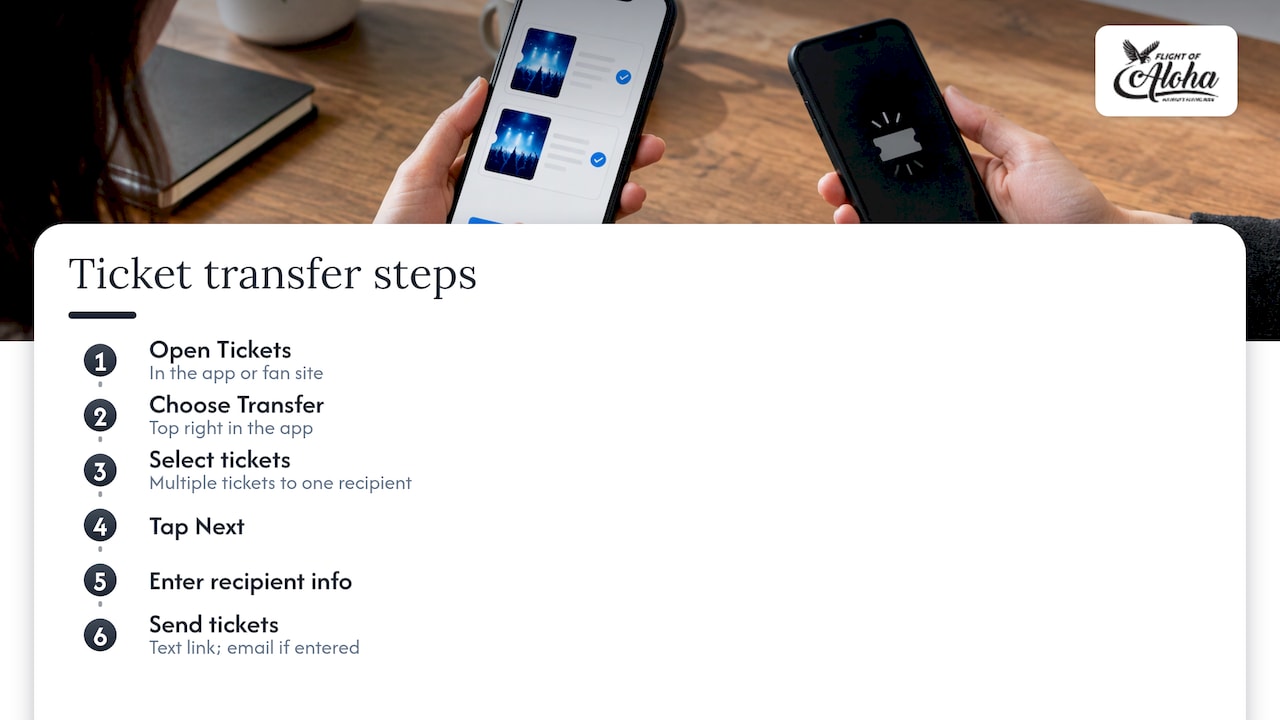
Traveling in a group where one person bought for everyone? HomeTown’s transfer guide says you can transfer multiple tickets to one recipient at a time, from the app or the fan site. In the app: Tickets tab, Transfer (top right), select tickets, Next, enter the recipient’s info, Transfer Tickets. The recipient gets a text with a link, and an email if you entered one.
Getting in at the gate
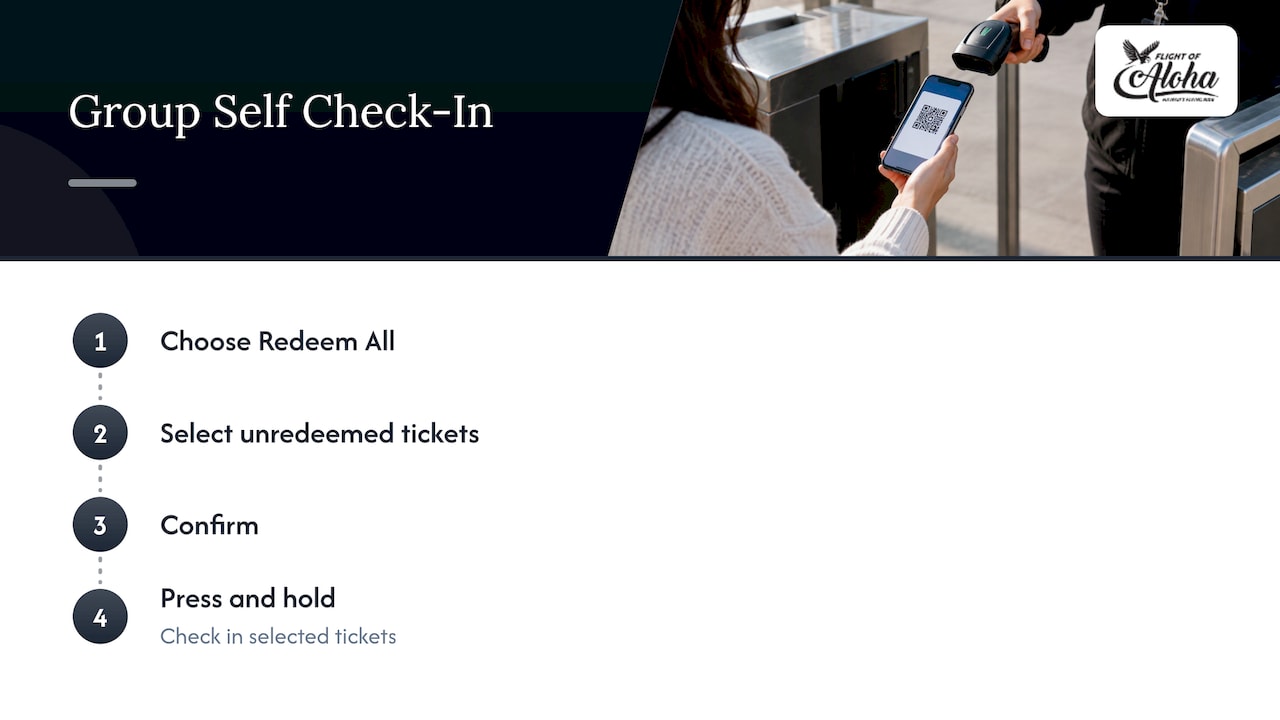
Events use one of two methods, according to HomeTown’s self check-in article. With Scan, a gate worker scans your ticket QR code. With Self Check-In, you redeem your ticket yourself before you enter. Self check-in tickets can’t be printed or saved to a mobile wallet, so have them on your phone. For a group, use Redeem All, select the unredeemed tickets, confirm, then press and hold to check in.
If you bought a pass, HomeTown’s redemption page says it’s accessed by email, on the website, or in the Fan App’s Passes section. For self check-in events you select the pass, pick the event, and follow the prompts.
Can’t find your tickets? Try this
Most problems come down to the email or phone number you used. Work through these in order:
- Check spam or junk. HomeTown’s troubleshooting page says to confirm the charge was processed, look in junk, and make sure [email protected] isn’t blocked.
- Add other emails or numbers to your profile. Missing tickets can mean you bought with a different contact than the one you’re signed in with.
- Log out and back in, update the app, and merge duplicate accounts. These are the steps in How Fans Find Tickets and Passes.
- Use the magic link. The same article says order confirmation pages and emails now include a login-free link to events.hometownticketing.com.
- Ask the gate volunteer. If nothing works, they can check you in manually using your name, phone, email, or ticket number.
HomeTown’s fan support page lists a phone line at 1-866-488-4849 and chat. Hours are listed in Eastern time and change by season, so a Hawaii visitor should convert the time zone before calling. Fans can also enter an email or phone number on the Events Page to look up purchased tickets without downloading the app.
Planning your Hawaii day around the game
School events are usually a few hours in the evening or on a weekend. That leaves your day free, and in Hawaii the weather and the sun decide a lot. Here’s how we’d fill it.
Kona: right by the pier
Our Kailua-Kona theater is within walking distance of the Kailua Pier and tender dock, so cruise visitors can fit a show into a port day without a car. Come in from the heat or a vog-hazy afternoon and you’re in a cool, indoor theater. When it’s raining on the Kona side, it’s a solid answer for the rainy-day question.
Maui: Whalers Village in Kaanapali
Staying on the west side? Our second location is at Whalers Village in Kaanapali. It’s an easy add-on for Maui families with kids who need a break between the beach and a game, and it works on a wet afternoon too. If you’re searching for Lahaina activities, our Lahaina film is a way to see the place from above.
Why it suits a mixed-age group
When the group includes grandparents, little kids, and a teenager headed to the game, you want something everyone can do. Flight of Aloha is designed to be accessible to all ages and abilities. You sit, and the experience moves you: 8K visuals, motion effects, scents, and wind simulate flying over Hawaii. Think of it as a smart alternative to a helicopter tour: aerial views of the islands without the high cost or the motion sickness worry.
Our perspective
Buying a ticket should be the easy part of your day. Whether you’re tapping through a school’s event page or booking a seat with us, the goal is the same: know what you’re getting, know when to show up, and have your ticket where you can find it.
We’re Native Hawaiian-owned, and we built Flight of Aloha around cultural storytelling rooted in Hawaiian legends, told with local advisors and storytellers. Naupaka, Lahaina, Whale Song, and Europe Merrie Monarch each tell a story as they take you over the land. Because it’s indoors and seated, it suits first-time visitors, kamaaina, families, cruise passengers with a few hours, and groups.
If you’ve got a ticket to the big game and a free afternoon, come fly with us first.
Ola
Our flights and prices
Prices below are as published on our site when we last read it in September 2026. They can change, and we run periodic promotions, so check the booking page for the current price.
| Experience | Published price |
|---|---|
| Single film: Naupaka, Lahaina, or Europe | $29.99 to $34.99 |
| Double Feature Flying Ride | $49.99 to $59.99 |
| VIP Package | $69.99 to $79.99 |
| Annual Pass | $200 per year |
If you live on the islands or come back often, the Annual Pass covers a year of visits. A gift card is available too, from our main site.

Pick your film, choose Kona or Kaanapali, and reserve online. You can also walk in, but booking ahead means your seat is waiting when the game, the cruise schedule, or the rain sets your plans.
FAQ
Do I need the app to buy HomeTown tickets?
No. HomeTown’s web guide says you can buy at events.hometownticketing.com with no app download. You choose the event, pick quantities, check out, and the tickets are emailed to the address you entered. The app is optional and mainly useful as a ticket wallet.
Where do I enter a HomeTown promo code?
Promo codes go in after you select your tickets, and they apply a discount at checkout. Presale and passcode codes are different: you enter those before choosing tickets. If no code field shows up, the event has no active code.
What if my tickets never arrive by email?
Check spam and junk, make sure [email protected] isn’t blocked, and confirm the charge went through. You can also enter your email or phone number on the Events Page to look up tickets. At the gate, a volunteer can check you in using your name or ticket number.
Can I buy Flight of Aloha tickets online too?
Yes. You can book online for our Kailua-Kona and Whalers Village Kaanapali locations, and walk-in booking is available as well. Single films, the Double Feature, VIP Package, and Annual Pass are all listed on our site.
Sources
- HomeTown Ticketing home page
- How To Purchase Tickets Online (Web)
- How to Purchase Tickets Online and in the Hometown Fan App
- Hometown Fan App poster
- Hometown Fan on the App Store
- Hometown Fan on Google Play
- Event Codes: Basics
- Hometown Help Center
- How to Transfer and Reclaim Tickets
- Self Check-In: Ticket/Pass Redemption
- How Do I Redeem My Tickets?
- Trouble Finding Tickets?
- How Fans Find Tickets and Passes
- Fan Support Contact Information
Book online to secure your seat.