
Process for VIP Ticket Upgrades: How It Works Step by Step
A VIP ticket upgrade usually follows one of two paths. Either the seller lets you add or swap to a VIP option on the ticket you already own, or you buy the VIP option as its own purchase. Which path you get depends on the seller and the event, so the fastest move is to check your account or the event page first. Below you’ll find the steps, the costs, what to show at the door, and how it works here at Flight of Aloha in Kailua-Kona and at Whalers Village in Kaanapali, Maui.
TL;DR
- Look for an upgrade option in your account (often called My Account, My Tickets or Wallet) or in the Add-Ons section of the event page.
- If you see no option, the event may not allow upgrades, the upgrade may be sold out, or your ticket type may not qualify. Contact the seller before buying anything new.
- Most upgrades charge the price difference. Some sellers add a fee, so read the checkout total.
- After you pay, the new ticket should appear in your account and the old one stops working. Show the new one at entry.
- At Flight of Aloha, the VIP Package is booked online, and it covers a double feature plus keepsakes.
The two ways a VIP upgrade works
Before you click anything, it helps to know which model you’re dealing with. The wording on the page tells you.
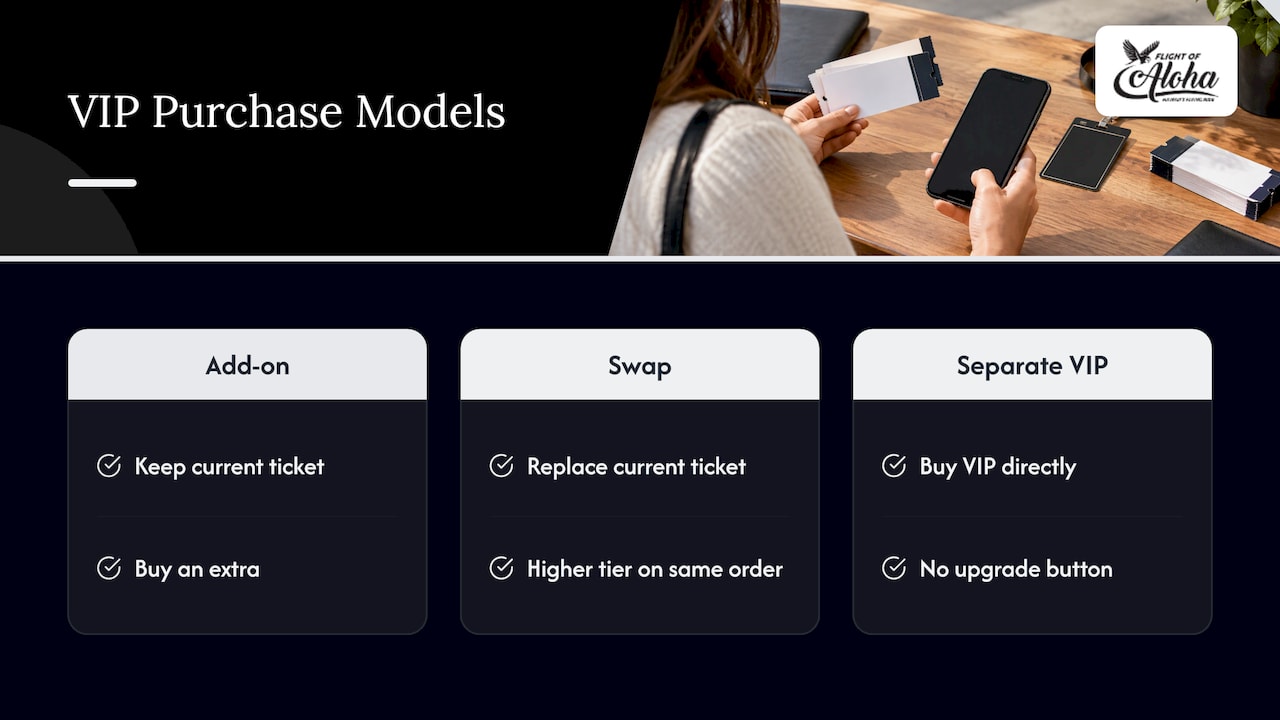
Add-on model. You keep your ticket and buy an extra on top. A large ticketing platform’s VIP guide says post-purchase upgrades may appear at the bottom of your account, and that an event page may list upgrades in an Add-Ons section.
Swap model. The seller replaces your current ticket with a higher one on the same order. One ticketing help center says its upgrade option swaps the current ticket for another on the same order, including a move from a regular ticket to VIP.
There’s also a stricter version of the swap. One app’s help center explains that the entire unused order is replaced. You pay the price difference, tax on that difference and a disclosed upgrade fee, and you can’t swap only part of an order. If you bought four tickets and want VIP for one person, ask about this before you start.
A third path is common too: the VIP option is simply a separate product. You buy it directly, with no upgrade button anywhere. That is how it works with our VIP Package.
Step-by-step: how to upgrade a ticket you already bought
The exact labels change from seller to seller, but the process is remarkably consistent.
1. Check that VIP exists for your event
Start on the official event page. Not every event sells VIP. If the page shows no VIP option, an upgrade is unlikely to appear later. Some sellers also run upgrades only for a limited window or while premium inventory lasts.
2. Log in where you bought the ticket
Use the same account that holds the order. Upgrades are tied to that order, so a ticket that was transferred to you or bought through a third party often can’t be upgraded from your login.
3. Find the upgrade control
Here is what sellers document:
- One ticketing platform’s UK guide says that if an eligible event shows Exchange/Upgrade in My Account, you can select and buy the available upgrade there.
- A help center for another service says to log in, open My tickets, and choose Upgrade my ticket under the ticket on the website, or use More under the QR code in the app, then finish the web checkout.
- A third documents a Wallet-based add-on process: log in, open Wallet, select the event card, scroll to Add-Ons, choose the item and quantity, then check out.
In that last system, organizer-enabled upgrades show up as an Upgrade button or an Upgrade Available label in Wallet.
4. Read the total before you pay
You want to see three numbers: the price of the new tier, the credit for your current ticket, and any fees or taxes. Then confirm the new tier is the one you want, because upgrades generally only go up. One help center states that upgrades to a cheaper ticket aren’t possible.
5. Complete checkout and confirm the swap
Completion counts only after payment succeeds. After that, the new ticket normally appears in your account and arrives by email within minutes, and the previous ticket’s QR code can no longer be used for entry. Another platform says completed upgrades automatically replace the original tickets, with updated tickets showing in Wallet immediately.
6. Screenshot the new ticket
Save the new ticket or QR code to your phone’s wallet or take a screenshot. Cell service can be patchy in busy venues. Delete or ignore the old one so nobody scans it by mistake.
What to do when you can’t find an upgrade option
No button doesn’t always mean no. It does mean you should stop and ask before spending money.
A UK ticketing guide lists three common reasons: the event doesn’t allow upgrades, the upgrades are sold out, or your ticket type is ineligible. It recommends contacting customer support if you’re unsure. Another knowledge base adds that post-purchase add-ons are controlled by the event organizer and may be absent even after you’ve bought tickets.
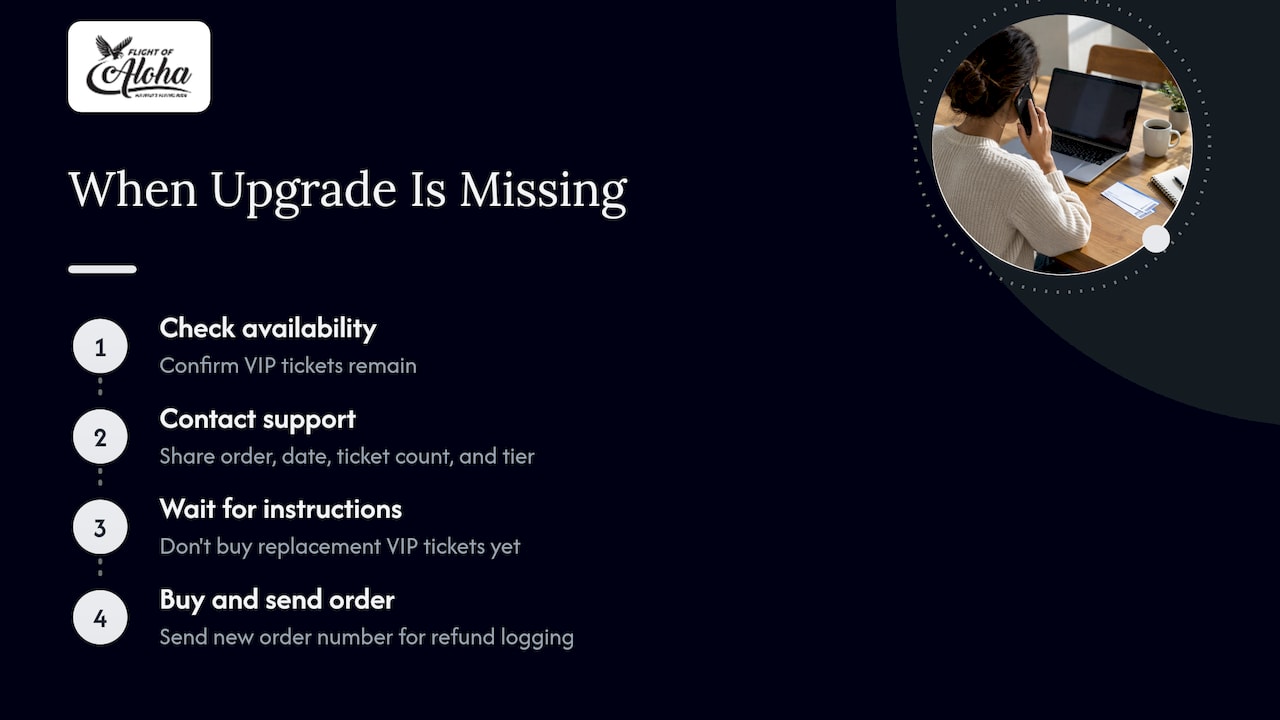
The mistake to avoid is buying a brand-new VIP ticket first and asking questions later. One ticketing support team advises checking whether VIP tickets remain, then contacting support before purchasing replacement VIP tickets, because buying first may leave a refund of your original ticket unguaranteed. In that process, you buy the VIP tickets only after support instructs you, then send the new order number so the face-value refund of the original can be logged.
A short message to support saves a lot of grief. Include your order number, the date, the number of tickets and the tier you want.
What a VIP upgrade costs
There’s no universal price. A UK guide says upgrade prices depend on the event and venue, the upgrade type and availability, and may rise as demand increases closer to the event. Fee structures also differ: one help center says an upgrade to a higher-priced ticket charges only the price difference, with no additional upgrade fee, while the stricter replacement model above adds a disclosed fee and tax.
Two habits keep surprises away:
- Upgrade early. Premium inventory can run out.
- Compare the checkout total against the tier’s list price on the event page.
What VIP usually includes
In music and live events, a large platform’s guide says VIP packages may include meet-and-greet access, soundcheck, designated check-in staff, a lounge, early entry and exclusive merchandise. Attractions work differently. The perks are usually tied to the experience itself: more content, a keepsake, a smoother visit.
That’s the idea behind our VIP Package.
How VIP works at Flight of Aloha
Flight of Aloha is a Native Hawaiian-owned immersive flying theater with two homes: Kailua-Kona, steps from the Kailua Kona Pier, and Whalers Village in Kaanapali, Maui. You sit in the seat, and the film, 8K visuals, motion, scents and wind carry you over Hawaii, with stories rooted in Hawaiian legends.
Here’s how our tiers stack up, with prices as published on our site:
| Option | What it is | Price |
|---|---|---|
| Single feature (Naupaka, Lahaina or Europe) | One flying film | $29.99-$34.99 |
| Double Feature Flying Ride | Two films in one visit | $49.99-$59.99 |
| VIP Package | Double feature plus keepsakes | $69.99-$79.99 |
| Annual Pass | Unlimited access for a year | $200 per year |
The VIP Package is our most popular choice. It includes a double feature with immersive AI digital photos, a physical 6×9 print in a branded photo jacket, and a commemorative Wings Pin souvenir.
The process is simple, with no hunting for a hidden button:
- Choose your location, Kona or Maui, on the VIP Package page.
- Pick your date and time, and the number of guests.
- Check out online and keep your confirmation email.
- Show the confirmation at the theater and pick up your keepsakes.
If you’ve already booked a single feature and want to add VIP, our own walkthrough on how to upgrade to a VIP pass covers it, and the VIP booking process guide shows each screen. For a broader look at what to expect, see our guide to VIP perks and packages in Hawaii.
If your plans change after booking, reach out to the team at the location you chose before you book a second ticket. Same rule as everywhere: ask first, then buy.
Is the upgrade worth it for your group?
Think about who’s in your party and what you’ll want afterward.
- Families. The prints and pin make a ready-made souvenir for kids (the ride welcomes ages 3 and up). One VIP package per family can double as a gift.
- Couples. A double feature gives you two different flights over Hawaii, and the print is a keepsake of the day.
- Cruise visitors. Our Kona theater is walking distance from the Kailua Pier and tender dock, so a double feature or VIP visit fits a short shore excursion. Check your all-aboard time, book a morning slot, and walk over.
- Frequent visitors and locals. If you’ll come back more than a couple of times, compare the VIP price with the Annual Pass at $200 per year.
For larger parties, our page on group ticket benefits explains what you get and how to use it.
Why flying with us beats a helicopter on many days
A lot of visitors weigh a helicopter tour against an indoor flight. We built Flight of Aloha to be the smart alternative: the feeling of soaring over waterfalls, coastline and valleys, without the steep cost of a helicopter tour and without worrying about motion sickness. It’s comfortable for all ages and abilities, and it’s the most accessible activity we know of in the islands.
It’s also the answer when the weather won’t cooperate:
- Rainy days in Kona or Maui. Helicopter flights depend on the sky. Our theaters are indoors, so a downpour doesn’t change your plans.
- Hot afternoons and vog. Step out of the heat and haze into our air-conditioned theater and cool off while you fly.
Our take on VIP
We get asked all the time whether VIP is worth it. Here’s how we think about it. Most people visit Hawaii once or twice, and they want something to hold on to when they get home. Our VIP Package is designed with that in mind: two films, photos and a print you can frame, plus a little Wings Pin.
We’re Native Hawaiian-owned, and we work with local advisors and storytellers, so the films carry real stories from these islands. VIP lets you stay in those stories a bit longer. If you only have time for one thing in Kona or Kaanapali, we’d love it to be this.
Ola
Ready to fly? Pick your location
Whether you’re escaping a rain shower in Kaanapali or ducking the midday heat near Kailua Pier, the VIP Package is the simplest way to turn one ride into the highlight of your trip. You can see the Kona theater details on our Kailua-Kona flying ride page, or go straight to the VIP Package for tickets in either location.
Gift cards are also available through our homepage, which works well if you’re planning for someone else’s trip.
Tips to avoid problems with any ticket upgrade
- Keep the original confirmation until the new ticket is in your account.
- Never buy a second ticket first if the seller offers an exchange. Ask support, then follow their instructions.
- Check the whole order. Replacement systems may swap every ticket on the order, not just one.
- Upgrade early when inventory is limited.
- Use the official page or app. Upgrade links from strangers are a common trap, and our guide on selling tickets online safely covers the habits that protect you.
- Confirm the entry details such as arrival time, location and what to show at check-in.
FAQ
Can I upgrade a ticket to VIP after I’ve bought it?
Sometimes. It depends on whether the organizer enables upgrades for that event and ticket type. Check your account for an upgrade or add-on option. If none appears, the event may not allow upgrades or they may be sold out, so contact the seller before you buy a new ticket.
Is a VIP upgrade an add-on or a new ticket?
Both models exist. Some sellers let you add an extra to your ticket, while others replace your ticket with a higher one on the same order. In a replacement, the old ticket stops working, so show only the new one at entry.
How much does a VIP upgrade cost?
It varies by event, venue and demand. Many sellers charge the difference between your ticket and the VIP ticket, and some add a fee. At Flight of Aloha, the VIP Package is $69.99-$79.99, compared with $49.99-$59.99 for the Double Feature Flying Ride.
What do I show at the door after upgrading?
Show the new ticket or confirmation from your account or email. Once an upgrade is complete, the original is usually void and can’t be scanned. Save the new one to your phone before you arrive.
What does the Flight of Aloha VIP Package include?
It includes a double feature, immersive AI digital photos, a physical 6×9 print in a branded photo jacket and a commemorative Wings Pin. It’s available at our Kailua-Kona and Whalers Village Kaanapali locations.
Sources
- How VIP Packages and Upgrades Work
- Upgrade Your Tickets | VIP Guide
- I want to upgrade my ticket, Shotgun Help Center
- Upgrading Your Tickets, Streets Help Center
- Can I upgrade my tickets to VIP? Skiddle Customer Support
- How to buy add-ons after your purchase, Tixr Knowledge Base
- How to upgrade your ticket, Tixr Knowledge Base
Book online to secure your seat.