
Use Ticket Promo Codes: Fix 80% of Code Failures at Flight of Aloha

Promo codes for ticket purchases get entered at checkout, in the box labeled something like “Promo Code” or “Add Credits/Gift Cards,” and they knock a dollar amount off your order total. Presale or unlock codes work differently: you enter those earlier, on the seat-selection page, just to unlock access to inventory. Quick next step: sign in, pick your seats, then look for the Add Promo/Gift Card field at checkout.
TL;DR:
- Enter a discount code on the order summary after choosing seats; presale or unlock codes go on the seat selection page and reveal inventory.
- Resale tickets generally do not accept promo codes, and valid offers may require particular event dates, seat sections, ticket types, or minimum spending.
- Use codes from official venue or artist emails, event newsletters, or verified partner promotions, then check expiration dates and quantity limits before checkout.
- Clear cookies and cache, switch browsers or devices, and disable VPN or Private Relay for technical errors; payment declines call for another method or retry.
- For Flight of Aloha bookings, verify the show, location, and package because offers may be limited; Annual Pass holders should check separate eligibility terms.
Step-by-Step Checkout Checklist for Entering Promo Codes
Most ticketing platforms follow the same basic flow, whether you are grabbing seats for a concert or booking a show in Kona. Knowing exactly where the promo field lives saves you from circling back through five screens wondering why nothing happened.
- Sign in to your account before you start browsing seats.
- Choose your event and date.
- Select your seats or ticket type, then click Next or Proceed.
- Look for “+ Add Credits / Promo Codes / Gift Cards” or a simple “Promo Code” box on the order summary screen.
- Paste your code (typing it out invites typos) and hit Apply.
- Confirm the discount actually shows up in your order total before paying.
On the Ticketmaster checkout flow, that sequence is spelled out almost exactly this way: sign in, pick seats, select Next, then open “+ Add Credits / Promo Codes / Gift Cards.” Desktop users usually see this field on the right-hand order summary panel, while mobile checkouts tend to tuck it under a collapsible “Have a code?” link near the payment section. Some mobile apps also split “Offer Code” and “Unlock Code” into separate menus, so double-check you are tapping the right one.
If you bought your tickets through a resale marketplace, do not be surprised if the promo field is missing entirely. According to Ticketmaster’s own support guidance, promo codes generally cannot be applied to resale tickets, since the seller already set that price. One more tip worth repeating: copy and paste your code instead of typing it. A single misplaced letter is the single most common reason a valid code gets rejected.
Why Your Promo Code Isn’t Working (And How to Fix It)
A rejected code is almost never a dead end. Most failures trace back to one of a handful of predictable problems, and most of those have a quick fix you can try before giving up.
- The code expired, or the event date falls outside its valid window.
- You did not meet the terms (minimum spend, specific seat sections, or eligible ticket types).
- You are trying to apply a promo code to resale tickets, which typically will not accept one.
- You are entering an unlock or presale code into the promo field, or vice versa.
- A simple typo slipped in, especially with codes that mix letters and numbers.
If the code itself checks out but the field still won’t cooperate, the issue is often technical. Try clearing your browser’s cookies and cache, switching to a different browser or device, and disabling any VPN or Apple Private Relay, since these can disrupt the session tracking that seat-selection pages rely on. Disney Theatrical Group’s support page recommends this exact combination of fixes when a promo code won’t apply.
Payment issues are a separate category entirely. Declined cards, checkout timeouts, and temporary “bot” blocks can all interrupt a purchase even with a perfectly valid code. Try a different payment method, or simply wait a few minutes and start again.
Pro Tip: Before contacting support, take a screenshot of the error message along with the code, event date, and the browser or device you used. It speeds up the fix considerably.
Finding Legitimate Promo Codes and Reading the Fine Print
The best codes come from sources you can verify: official venue emails, artist or event newsletters, and confirmed partner promotions. Our own breakdown of discounted attraction tickets walks through several of these channels in more detail.
Once you have a code in hand, read the terms before you get attached to the savings.
- Check the expiration date against your actual travel or event dates.
- Confirm which events, dates, or seat types the code applies to.
- Look for minimum spend requirements or quantity limits.
- Verify the code is not excluded from resale tickets, which is common.
Be cautious with codes floating around on social media from accounts you don’t recognize. The FTC’s endorsement guidelines note that influencers and sellers are expected to clearly disclose material restrictions, like expiration dates or purchase conditions, before you check out. A unique code from an influencer often signals a paid partnership rather than a universal deal, so it pays to confirm the terms yourself rather than assuming it applies broadly.
Applying Promo Codes to a Flight of Aloha Booking
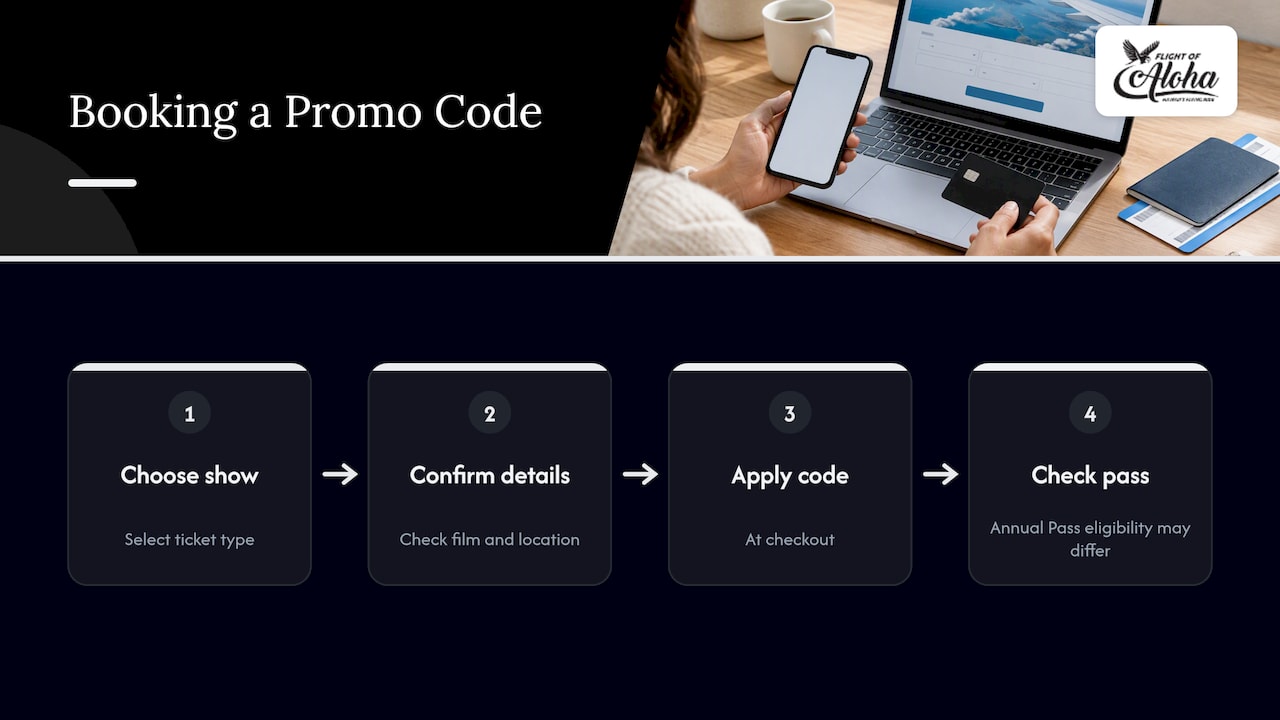
Booking a show with us in Kailua-Kona or at Whalers Village Kaanapali follows the same basic rule: the promo field appears at checkout, after you have chosen your show and ticket type. Whether you are booking Naupaka, Lahaina, Europe, a Double Feature, or a VIP Package, confirm the specific film and location before applying a code, since some offers are tied to a particular show or package rather than every ticket we sell. Annual Pass holders should check the pass terms separately, as promo eligibility can differ from single-show pricing. For more on how our discounts and packages work, our guide to ticket discounts and booking walkthrough cover the details.
Why We Keep Promo Rules Simple
We built our ticketing flow so families, cruise visitors stepping off the Kailua Pier Tender Dock, and budget-minded travelers never have to guess where a code goes or whether it will work. That clarity matters more on vacation, when nobody wants to spend ten minutes untangling a checkout screen. As a Native Hawaiian-owned attraction, we also care about getting people in the door comfortably: indoors, out of the heat and vog, and away from the price tag and motion sickness that come with a helicopter tour.
— Ola
Book Your Flight of Aloha Seats Today
We accept promo codes at checkout, right in the order summary where you add gift cards or credits, so any valid offer applies before you pay. As one of the accessible activities in Kona and Maui, we make a great rainy-day plan, a cool escape from the heat and vog, and a smart alternative to helicopter tours, with no aerial motion sickness. For cruise passengers, we sit walking distance from the Kailua Pier Tender Dock, perfect for a quick shore excursion between ship calls.

- Browse single shows like Naupaka, Lahaina, or Europe.
- Save with the Double Feature Flying Ride for two films in one visit.
- Upgrade your visit with our VIP Package.
Book online to secure your seat.
FAQ
Does Ticketmaster offer a college discount?
Ticketmaster’s own support pages do not list a standing college discount program. Promo codes for student pricing, when available, typically come through a specific event organizer or venue rather than a universal Ticketmaster offer, so check the event page directly.
What is an example of a promo code?
A promo code is typically a short string of letters and numbers entered at checkout that reduces your order total by a set dollar amount. According to Ticketmaster’s help center, this is distinct from a passcode or unlock code, which grants access to special inventory rather than a discount.
How do I apply a coupon code to confirm a ticket order?
Sign in, select your event and seats, then click Next until you reach the order summary screen. From there, open the “Add Credits/Promo Codes/Gift Cards” field, paste your code, and select Apply before completing payment, as outlined in Ticketmaster’s presale guidance.
What should I check before buying tickets with a promo code I found online?
Confirm the code comes from an official source, like a venue newsletter or verified partner, rather than an unknown social post. Then check the expiration date, eligible ticket types, and whether it excludes resale tickets before you commit to a purchase.
Sources
- How do presales work? – Ticketmaster Help
- Promo Code Not Working – Ticketmaster – Disney Theatrical Group
- FTC’s endorsement guides: What people are asking